Google preferred sources: the one AI visibility control your readers hold
Google preferred sources is a Search setting that lets a reader name the sites they want to see more of. Once someone picks your site, your content is more likely to appear in Top Stories with a “preferred” badge, and it can carry that badge in AI Overviews and AI Mode for that reader. Since August 2026 you can put Google's own “Add to Preferred Sources” button directly on your pages, so a reader opts in without leaving your article.
Source: Google Search Central, Preferred Sources for web publishers, last updated 20 August 2026.
What Google preferred sources actually is
Preferred sources began as a Top Stories feature: a reader tells Google which publications they want to see more of, and Google weights that reader’s news results accordingly. Selected sites appear more often, marked with a preferred badge.
The part that matters for anyone working on AI visibility came later. Google’s documentation now states that in AI Mode and AI Overviews, content from a site the reader selected can carry the same preferred badge. A setting that started as a news-carousel preference now reaches generated answers.
On 20 August 2026 Google added the last piece: an embeddable button you put on your own pages, so a reader opts in without going to a settings screen and comes straight back to where they were reading. Google reported at the same time that readers had selected more than 600,000 unique sources, around 255,000 more than it had reported at the end of May.
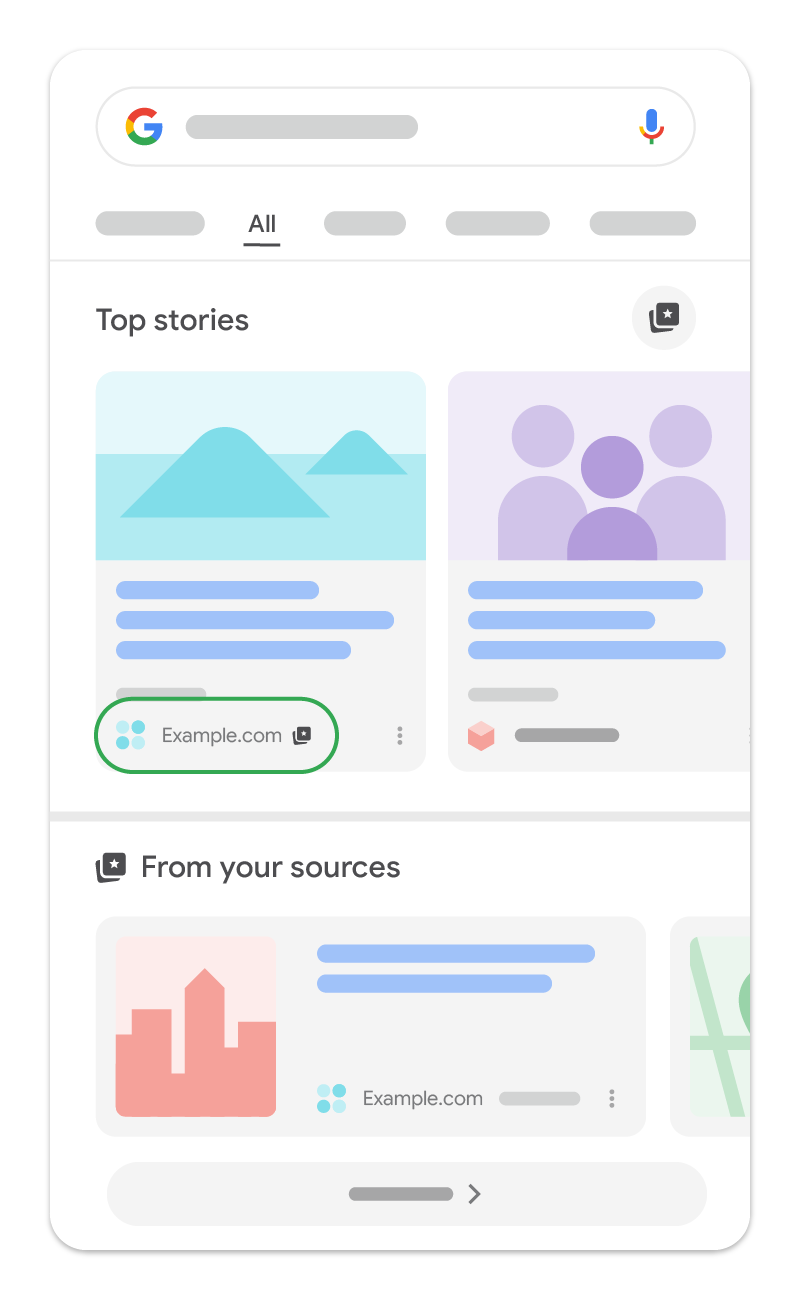
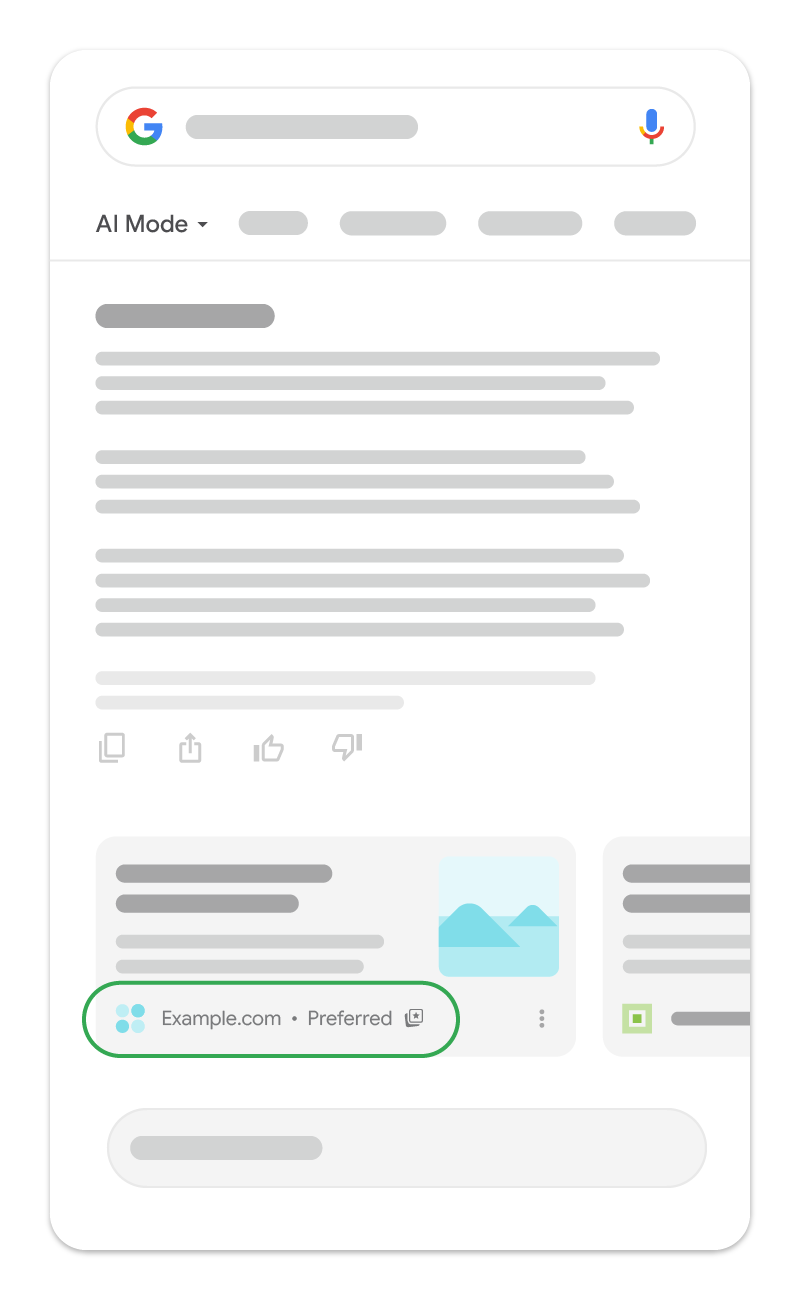
The short version
- A reader chooses you once. Their Top Stories, AI Overviews and AI Mode results tilt toward you from then on.
- Available globally for Top Stories in every language Google Search supports, and in AI Mode and AI Overviews wherever those exist.
- Only domains and subdomains are eligible. A subdirectory such as example.com/blog is not.
- No schema, no markup, no application. Adding the button is promotion, not qualification.
Why preferred sources matters for GEO and AEO
Nearly everything in generative engine optimization is an argument aimed at a machine. You publish clean entities, quotable answers and valid schema, and hope a model finds you worth citing. Preferred sources is different in kind: it is a reader instruction, and it lands in the same AI surfaces you have been trying to reach indirectly.
It reaches AI Overviews and AI Mode
Almost every other lever you have is an input to a ranking system that decides, on its own, whether you were relevant. This one is a reader instruction that follows them into AI surfaces. For anyone doing GEO or AEO, it is the only control that touches generated answers without an algorithm in between.
It is a demand-side signal, not a supply-side one
Schema, llms.txt and page structure all argue that you deserve to be cited. A preferred source is a reader saying they want you. Google does not have to infer intent from behaviour because the reader stated it, which is why the effect is per-reader rather than sitewide.
It compounds with the audience you already earned
The button converts existing attention into durable visibility. Someone who already reads you clicks once, and every future Top Stories and AI answer for them is weighted toward you. That is closer to an email subscription than to a ranking factor.
It is cheap and reversible
Two lines of HTML, no schema requirement, no eligibility application, nothing to maintain. If it does nothing for you, delete the div. The cost of trying it is measured in minutes, which is the strongest argument for doing it this week rather than evaluating it.
The honest framing. This does not reach strangers, and it will not fix a brand that AI assistants currently describe wrongly or skip entirely. It compounds an audience you already have. The structural work is still what earns you citations from people who have never heard of you, which is why the two belong together rather than in competition.
How a reader makes you a preferred source
There are two routes, and the difference between them is the entire reason the button exists.
Route one, the settings screen
A reader opens google.com/preferences/source, searches for a publication and selects it. This works, and almost nobody does it, because it requires a reader to leave what they were doing and go and administer their search settings.
Route two, the button on your page
You put Google’s button in your article. The reader clicks it at the moment they are enjoying your work, completes the flow, and is returned to exactly where they left off. The ask happens at peak intent instead of requiring a separate errand, which is why this is the version worth implementing.
Check eligibility first. Enter your domain in the source preferences tool before you build anything. If your site does not appear there, the button has nothing to add and you will be debugging an empty div for an hour. Only domains and subdomains are listed.
How to add the button to your site
Google documents three implementations. Almost everyone should use the first one.
1. Standard JavaScript, two lines
Google renders a localised, correctly styled button and handles the whole flow. Load the library once in your <head>:
<script async src="https://news.google.com/swg/js/v1/publisher.js"></script>Then drop an empty div wherever the button belongs:
<div google-add-preferred-source-btn></div>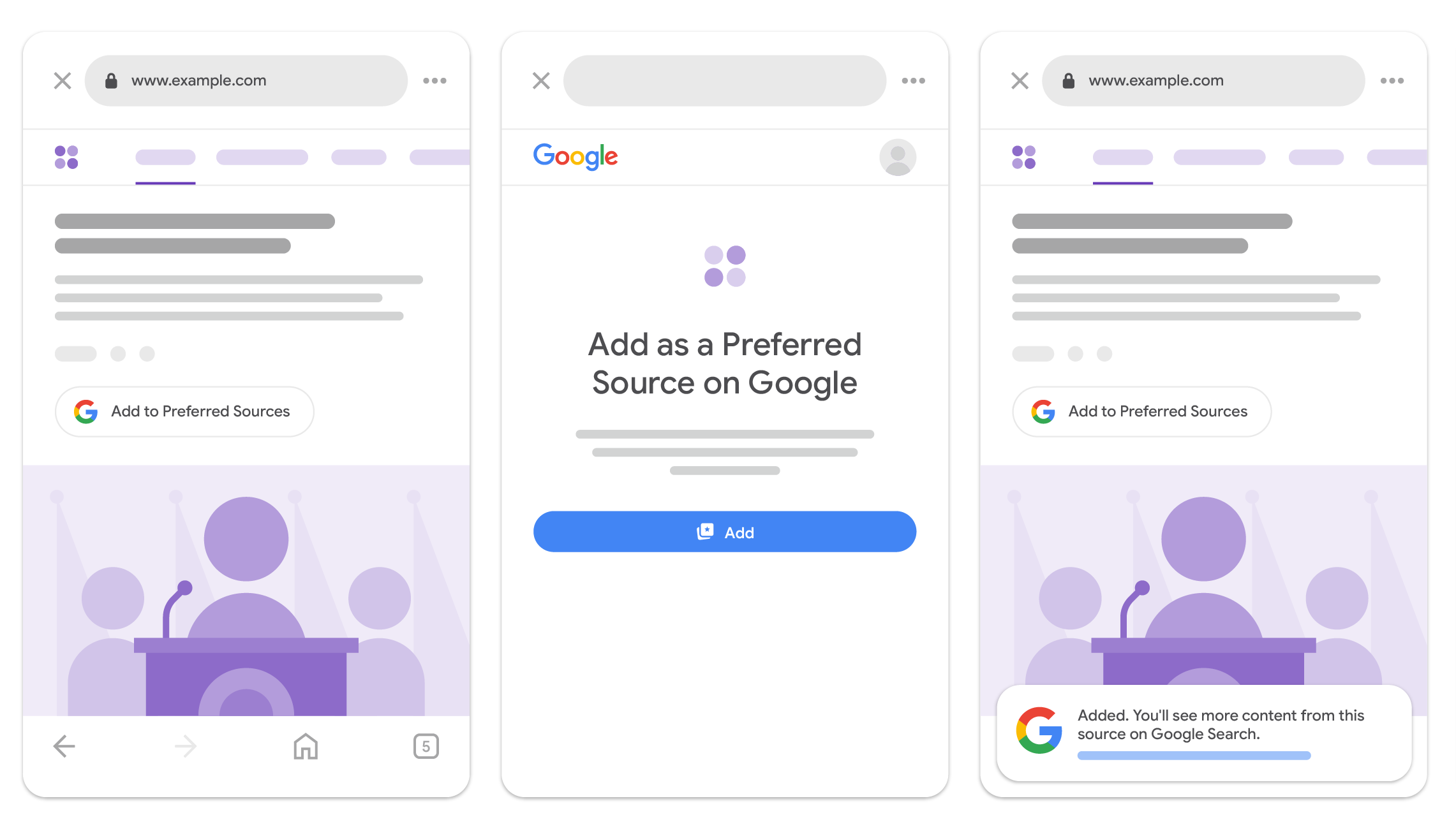
Two optional attributes. Theme defaults to light:
<div google-add-preferred-source-btn data-theme="dark"></div>Language follows the reader’s browser unless you override it (supported language codes):
<div google-add-preferred-source-btn data-lang="en"></div>2. Advanced JavaScript, your own design
If you want to trigger the flow from your own UI, import the SDK and bind it to any element. The reader-facing flow is identical; only the trigger is yours.
import { preferredSource } from
  "https://news.google.com/swg/js/v1/publisher.mjs";

// 1. Initialize directly using the imported module instance
preferredSource.init({
  theme: 'light', // Theme choice: "light" or "dark" (default "light")
  lang: 'en'      // Optional: override language (defaults to page language)
});

// 2. Programmatically bind flow invocation using a click handler
const button = document.querySelector('#myButton');
button.onclick = () => {
  preferredSource.addPreferredSource();
};
There is a script-tag equivalent using a PREFERRED_SOURCE callback queue with preferred-sources-control="manual" to stop automatic rendering. Google also publishes a live demo covering both, and official translated badge assets if you are designing your own.
3. Deeplink, when JavaScript is not an option
A plain URL, so it works in a locked-down CMS, and anywhere else a script cannot go. Swap in your own domain:
<a href="https://www.google.com/preferences/source?q=example.com">
  Add as Preferred Source
</a>
Do not treat this purely as a fallback. It is the only version you can put in a newsletter, a social bio or a video description, which are exactly the places your most committed readers already are.
What we learned shipping it on sophyx.io
We put the button on every page of this site on 27 August 2026. The two-line version in the documentation is accurate and it is not sufficient, because it does not describe what happens on a real site with existing chrome and a mixed audience. Four things cost us time. None of them are in the docs.
Google renders nothing for readers who are not eligible
Symptom: An empty floating box on a large share of your traffic.
publisher.js only injects its iframe for readers who are signed in and in a supported locale. For everyone else the div you added stays empty, and any card, border or heading you wrapped around it still renders. We gate the chrome behind a MutationObserver on the slot and only reveal it once Google has actually put a child element inside.
Google's slot collapses a shrink-to-fit parent to zero width
Symptom: The button is in the DOM and completely invisible.
Google sets width: 100% and min-height: 60px on its slot, then absolutely positions the button iframe inside it. Put that in a parent that sizes to its content and the two collapse each other: the parent asks the child how wide it is, the child answers 100% of the parent. An explicit width on the wrapper is what makes it render at all. We use w-72.
It needs somewhere to live that is not already taken
Symptom: Two floating controls fighting over the same corner.
The button is persistent chrome, so it competes with everything else docked to a viewport edge. On sophyx.io the sticky CTAs are bottom-centre and the scroll-to-top control is bottom-right, so the button went bottom-left, lifted above the mobile CTA bar. Decide this before you ship rather than after a reader reports the overlap.
A control you cannot dismiss becomes a nuisance
Symptom: Readers who already said no, asked again on every page.
The button has no built-in dismiss. We added one that persists the choice in localStorage, so a reader who declines does not get asked again on the next article. This is not in the documentation and it is the difference between a helpful prompt and a cookie banner.
Net effort: about an hour, most of it spent on the invisible-button problem before we found the width interaction. If you copy the two rules above, it is a ten-minute job.
Add Sophyx as a preferred source
This is not a screenshot. It is Google’s real button, running on this page through the exact implementation described above. Click it and you will see the whole flow from the reader’s side, then land back here.
This is Google's real button, rendered live on this page.
The same button is docked in the bottom-left corner of every page on this site, which is what the sitewide version looks like in practice. The deeplink, if you would rather see the raw flow: google.com/preferences/source?q=sophyx.io
What preferred sources will not do
Worth being precise about, because the feature is being written up in places as an AI visibility fix. It is not one.
It does not reach anyone who has not chosen you
The effect is per reader. A stranger asking ChatGPT or Google AI Mode about your category is unaffected by how many other people made you a preferred source.
It does not change what AI says about you
If assistants currently describe your business wrongly, recommend a competitor, or omit you from the answer entirely, a badge on the readers who already like you does not touch any of that.
It is Google only
Top Stories, AI Overviews and AI Mode are Google surfaces. ChatGPT, Claude, Perplexity and Copilot have no equivalent setting, and for most brands those account for a large and growing share of the answers that matter.
It is not a ranking factor you can optimise
There is no threshold to hit and no score to raise. You either asked your audience or you did not, so treat it as an audience conversion task rather than an SEO one.
Add the button this week because it is ten minutes and it compounds. Then go and do the work that reaches the people who have never heard of you, which is where the actual gap usually is. A free audit shows you which prompts you are invisible for.
The ten-minute checklist
- 1Check that your domain appears in Google's source preferences tool. If it does not, none of the rest applies yet.
- 2Confirm you are promoting a domain or subdomain. Subdirectories such as example.com/blog are not eligible.
- 3Add publisher.js to your <head>, once, sitewide rather than per page.
- 4Place the empty div where you want the button, and give its wrapper an explicit width.
- 5Hide your own chrome until Google has actually rendered into the slot.
- 6Pick a screen position that does not collide with your existing sticky controls.
- 7Add a dismiss control that remembers the answer.
- 8Add the deeplink to your newsletter and social bios, where the JavaScript cannot reach.
- 9Ask for the click where the reader is already satisfied: end of article, not a page-load interstitial.
Frequently asked questions
- Preferred sources is a Google Search setting that lets a reader name the publications they want to see more of. When a reader selects your site, your content is more likely to appear in Top Stories highlighted with a “preferred” badge, and it can carry that badge in AI Overviews and AI Mode for that reader. It is set per reader, so it changes their results rather than your ranking in general.
- Add two lines of HTML. Put <script async src="https://news.google.com/swg/js/v1/publisher.js"></script> in your <head>, then place an empty <div google-add-preferred-source-btn></div> wherever you want the button to appear. Google renders its own localised, styled button into that div. You can set data-theme to light or dark, and data-lang to override the language. If you cannot run JavaScript, link to https://www.google.com/preferences/source?q=yourdomain.com instead.
- Yes. Google's documentation states that in AI Mode and AI Overviews, content from a site a reader has selected can be highlighted with a “preferred” badge for that reader. That makes it one of the very few publisher-side controls that reaches generated answers directly rather than through the ranking system.
- Only domain-level and subdomain-level sites are eligible, so https://www.example.com/ and https://code.example.com/ qualify but the subdirectory https://www.example.com/blog does not. Check by entering your domain in Google's source preferences tool at google.com/preferences/source. If it appears there, you can promote it. Adding the button does not itself make you eligible.
- No. There is no markup requirement, no schema to add and no application to file. The implementations Google documents are ways of promoting the feature to your readers, not requirements for appearing in it. The feature is available globally for Top Stories in every language where Google Search is available.
- Two common causes. First, Google renders nothing at all for readers who are not signed in or are in an unsupported locale, so an empty slot is expected for part of your traffic and you should hide your own wrapper until Google has rendered into it. Second, Google sets width: 100% on its slot and absolutely positions the iframe inside, so a parent that sizes to its content collapses to zero width. Give the wrapper an explicit width.
- Google reported on 20 August 2026, alongside the launch of the embeddable button, that readers had selected more than 600,000 unique sources, roughly 255,000 more than it had reported at the end of May 2026. Those are Google's figures for the feature overall, not a measure of what any individual site should expect.
- Not in the general sense. It changes what a specific reader sees after that reader has chosen you, rather than moving your position for everyone. Treat it as a way to convert an audience you already have into durable visibility with those same people, not as a ranking tactic that reaches strangers.
- Generative engine optimization and answer engine optimization are mostly supply-side: schema, llms.txt, clean entity definitions and quotable answers that make you easy for a model to cite. Preferred sources is the demand-side counterpart, where a reader tells Google they want you. Do both. The structural work is what earns citations from strangers; the button is what compounds the audience you already earned.
The button is the easy half
Preferred sources compounds the audience you already have. Sophyx handles the other half: which prompts you are invisible for, what AI assistants say about you when you are not in the room, and the pages, schema and files that fix it.
Results in about 60 seconds. No credit card.
Explore next