The Prompt Is Not the Target: How AI Search Rewrites, Expands, and Fans Out Your Queries
ChatGPT, Gemini and Perplexity search with their own rewritten versions of your question. Here is how that works, and how to show up.
Short answer
AI search often looks things up with different words than you typed. ChatGPT documents that it may rewrite a prompt into one or more targeted queries, run more specific follow-up searches, and use memory and location. To get found, match those rewritten searches: full questions, other words for the same thing, clear names, the current year.
1. Executive summary
In ChatGPT search, the prompt you type is only the starting point. OpenAI says ChatGPT may decide whether to search, read the whole chat for context, rewrite your prompt into one or more targeted queries, then run more specific searches, using memory or your general location.[1][2] Deep research goes further: it makes a plan, reads many sources and writes a report with citations.[3][4]
So the search mixes your words with what the AI thinks you mean, the earlier chat and what it knows about you. The goal is to match the need the AI works out from your prompt. Search researchers saw this decades ago: people describe what they want imperfectly, and rewriting the request helps.[11][12]
For AI visibility, answer engine optimization (AEO) and generative engine optimization (GEO), all names for getting your business named in AI answers, this changes what “ranking” means.
2. The pipeline from prompt to answer
your prompt → what the AI thinks you mean → whether to search → rewritten and split-up searches → pages it finds → an answer with sources
OpenAI’s documentation and the research on retrieval-augmented generation (RAG: AI that looks things up before it answers) both describe this path. ChatGPT decides whether to search from what you ask, and reads follow-ups in light of the whole chat.[2] It sometimes rewrites a query into several targeted queries and sends more specific searches to outside providers.[1]
Working backwards from the answer:
- The answer sums up the sources it picked, with citations. Deep research also shows how the research went.[1][3]
- Before that comes retrieval: the pages that matched its searches.
- Before that come several rewritten searches, in the model’s own words.[7]
- At the start, the AI works out what you mean, what is missing, and whether to search, ask you, rewrite, split the question or just answer.[8][11]
OpenAI’s Model Spec covers that first step: the assistant should work out what the user means and ask when the request is unclear.[6] Your typed words are only part of the input. Memory can shape the search query, and IP-based location can change local results.[1]
3. Why AI systems rewrite and decompose queries
Because people’s prompts are often vague, incomplete, ask several things at once, or use different words from the pages that hold the answer. A survey of conversational search calls rewriting (expanding, rewording and splitting a query) a crucial first step, especially when later turns in a chat leave out context.[11]
Search research knew this long before AI chat. Broder showed that the need behind a query differs from the words typed.[12] Jansen and colleagues found that more than 80% of the web queries in their data were informational, and built a classifier to guess intent from short queries.[13]
Rewriting is a standard step
Adding a rewrite step before retrieval (Rewrite-Retrieve-Read) improves results, even with a live web search engine.[7] Ambiguous or complex questions often need rewriting, splitting into simpler sub-queries and disambiguation first.[8] Splitting a complex question finds more sources and improves answers that need several facts combined.[9]
Google Research found that query expansions written by an LLM beat older methods, especially with step-by-step (chain-of-thought) prompting.[10] And OpenAI’s Retrieval API ships automatic query rewriting as a built-in feature.[5]
So the goal is retrievability after reformulation: being found once your buyer’s question has been rewritten.
4. What this means for brand visibility and recommendations
OpenAI’s own example: asked “what’s the latest on the development of drugs that target CCR8 for cancer?”, ChatGPT might search “CCR8 immunotherapy drug development 2025”, then, after reading the results, “CHS-114 conference 2025”.[1]
Another: asked “what are some restaurants near me that I’d like”, ChatGPT may search “good vegan restaurants San Francisco” when memory says the user is vegan and lives there.[1] If a competitor’s page matches that rewritten search better than yours, the AI recommends them. That is how competitive brand displacement happens.
Think prompts, not keywords. Write for the questions the model is likely to search: full stand-alone questions, other words for the same thing, your full business name, the current year, narrow subtopics.[10][11]
Access matters too. Sites must allow OAI-SearchBot (OpenAI’s search crawler) to appear in ChatGPT search answers. Sites that block it are left out, though they may still show as navigational links, and nobody is guaranteed the top spot.[1][14] Check your crawl rules with the free robots.txt checker and publish an llms.txt file (a short guide to your site, written for AI).
In AI search, the model’s rewritten version of the question decides which pages get found, ranked and quoted.
5. How to inspect fan-out queries manually
OpenAI documents the rewriting.[1] It does not document a way to see it. Guides from Semrush and Sandbox Web found that in some ChatGPT search chats, the browser’s network data has a field like search_model_queries holding the rewritten searches.[15][16]
Caveat: this unofficial method can stop working without notice. The rewriting it shows is documented either way.
Step 1: Trigger a search and copy the conversation ID
In your own ChatGPT account, run a prompt that searches the web (the answer shows sources). Copy the conversation ID: the long code after /c/ in the address bar.
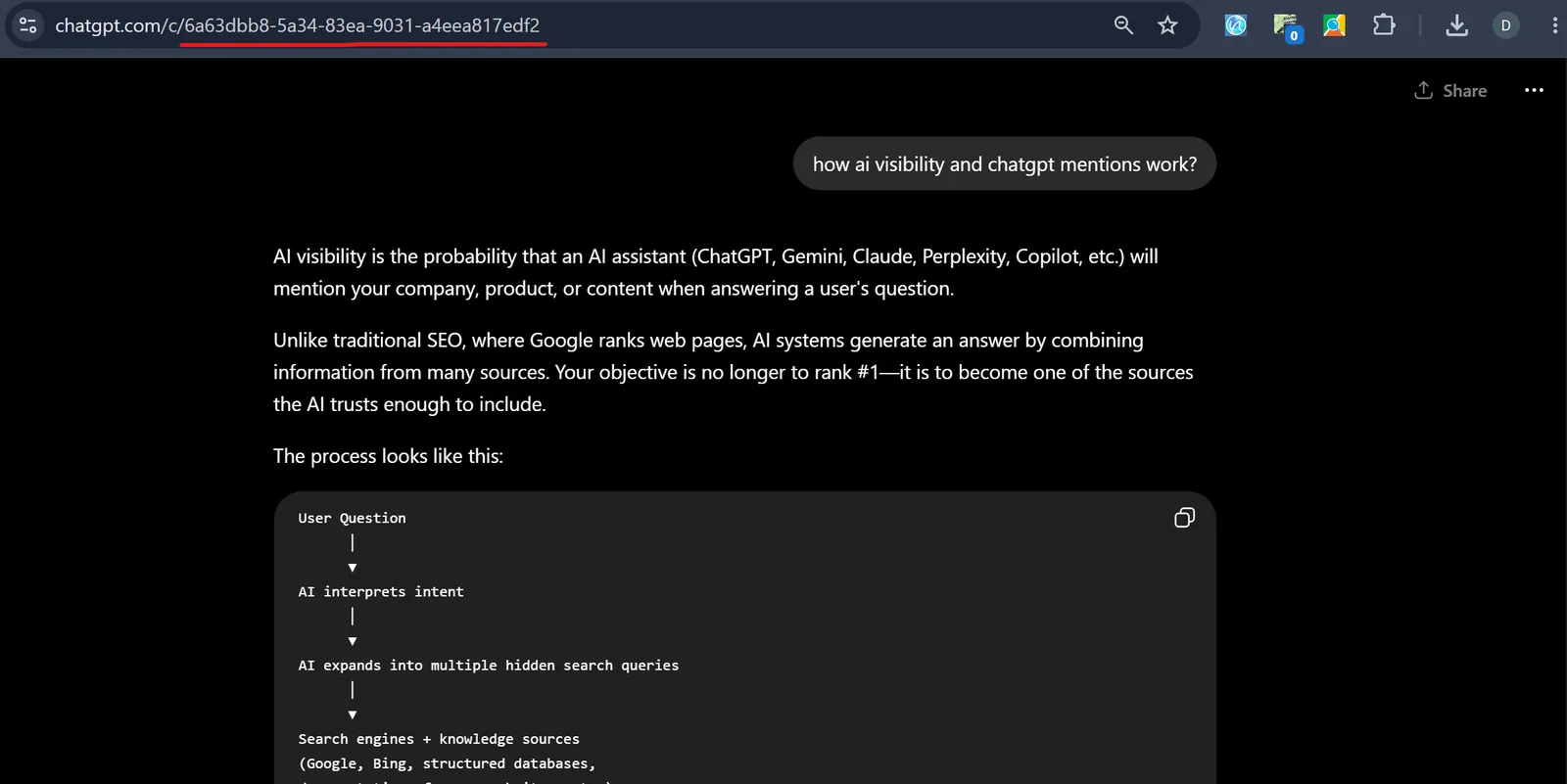
Step 2: Open DevTools and go to the Network tab
Open developer tools (F12, or right-click → Inspect) and pick the Network tab.
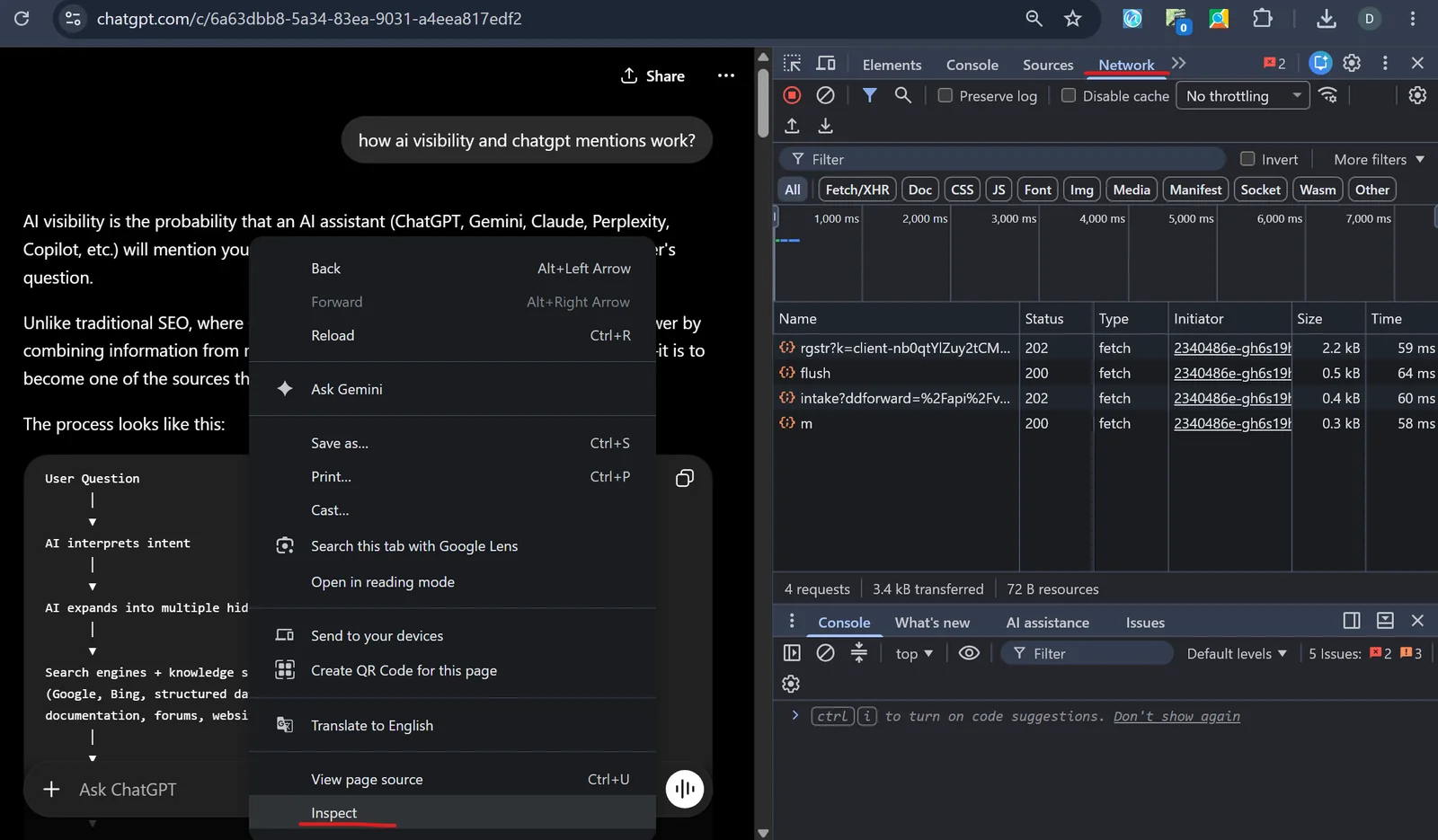
Step 3: Reload and filter by the conversation ID
Reload the chat, paste the conversation ID into the filter box, and look for fetch/XHR requests.
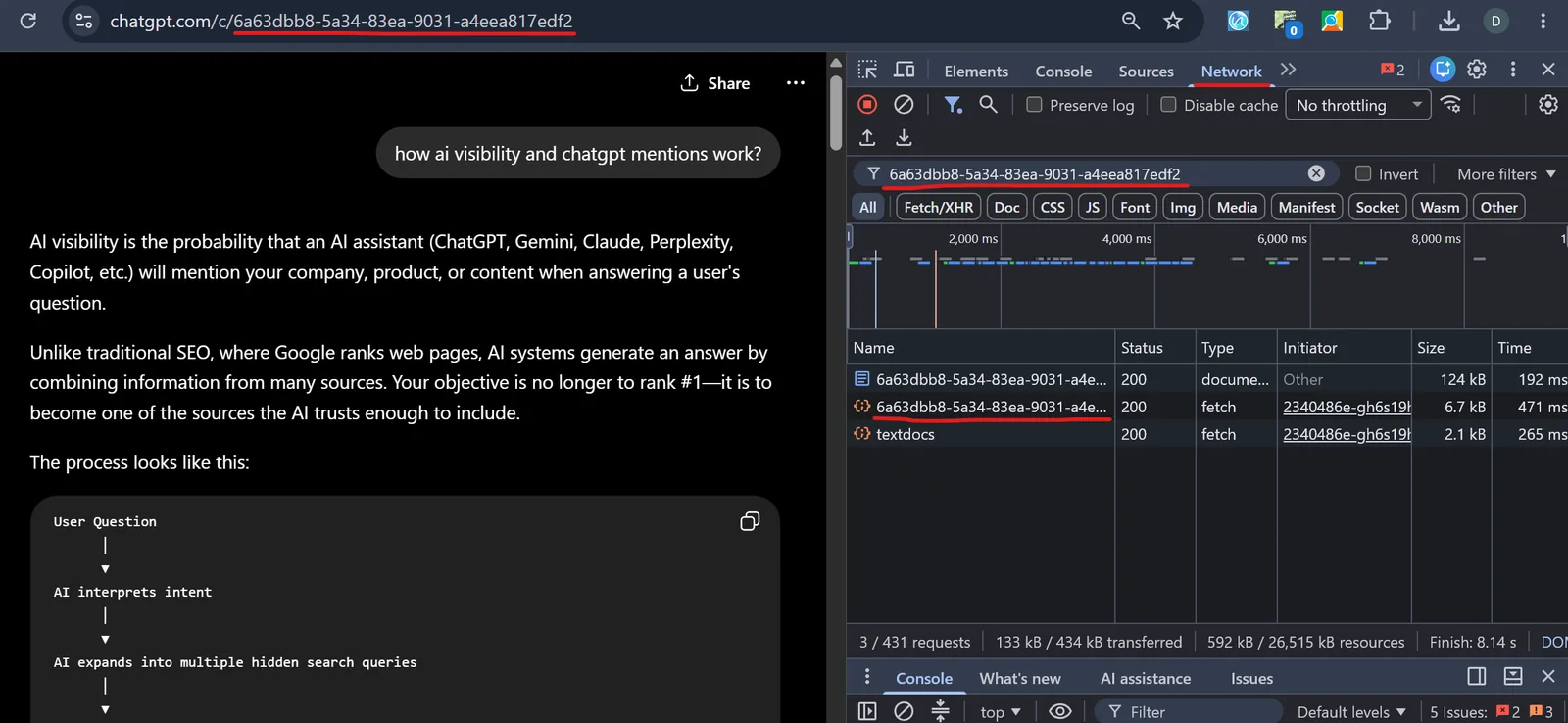
Step 4: Open the JSON response
Click the matching request and open its Response (or Preview) tab.
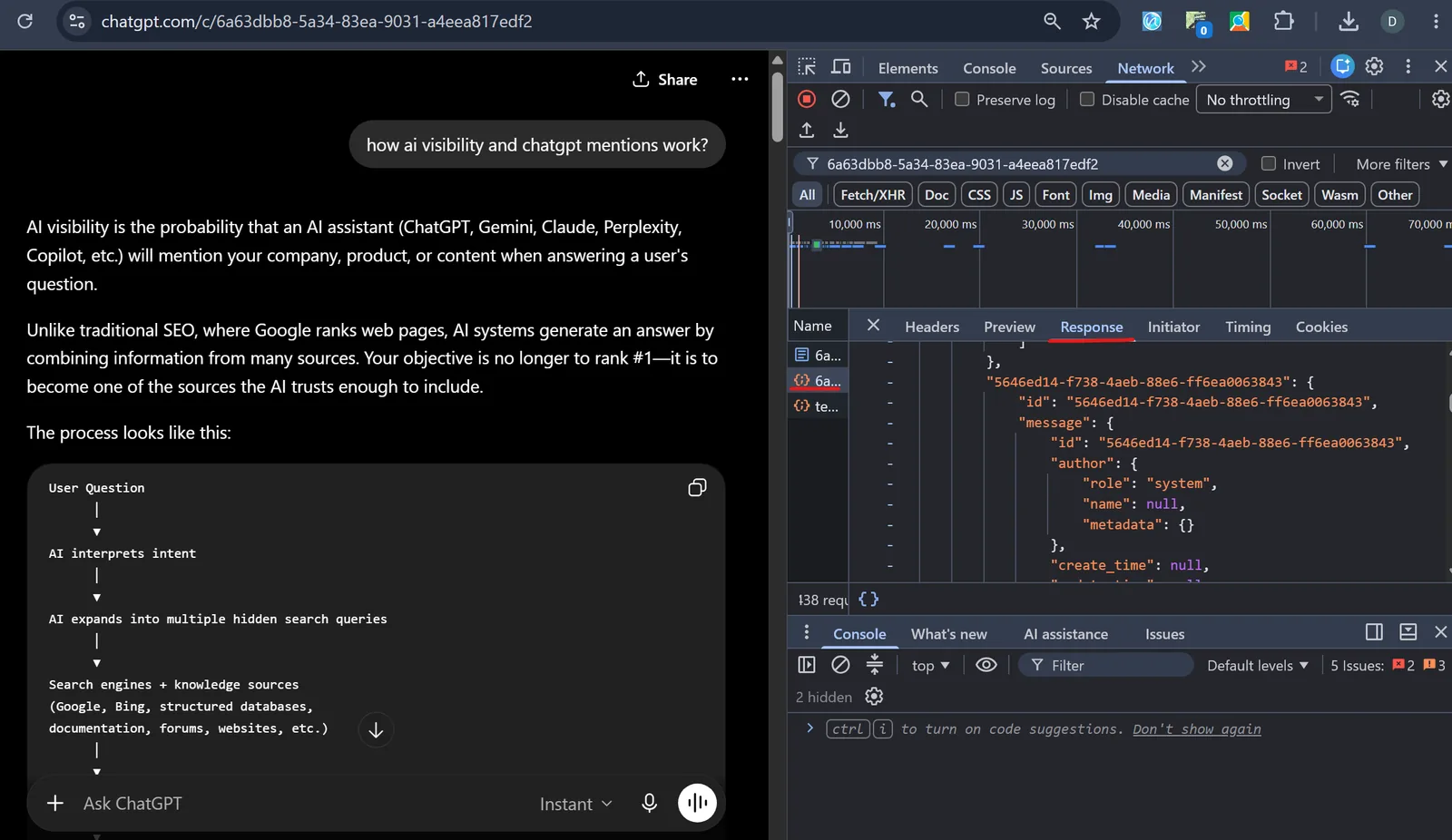
Step 5: Search for search_model_queries
Press Ctrl+F (Cmd+F on Mac) and search for search_model_queries (or queries). That list is the searches ChatGPT ran in place of your prompt.[15][16]
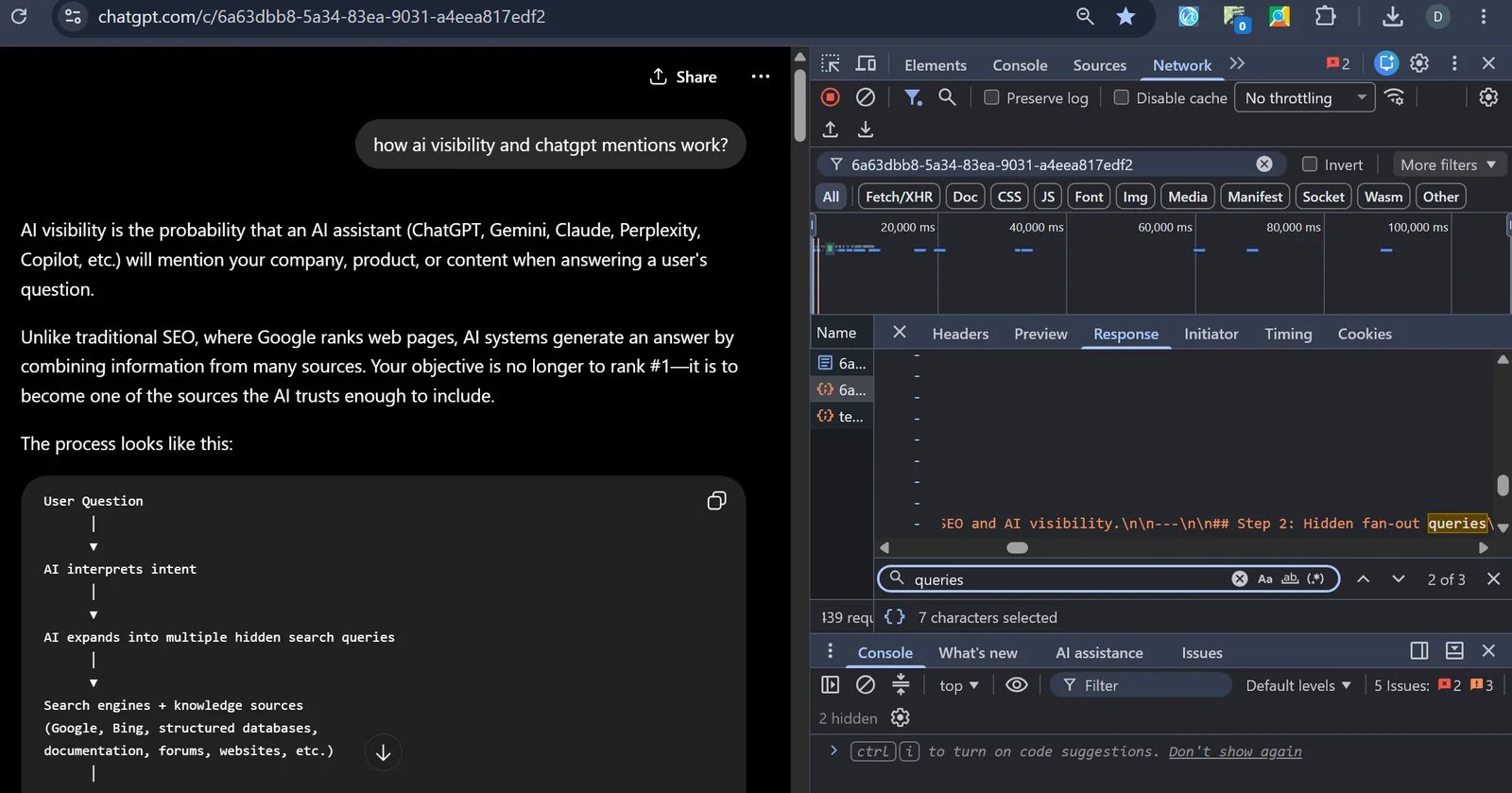
Compare what you typed with what it searched. That difference is what Sophyx’s prompt optimization works on, across hundreds of prompt variants.
6. Optimizing for the rewritten query: the playbook
Five moves follow from the evidence:
- Answer full questions. Cover the specific questions a model would write (clear names, the year, the subtopic), one question per section. This is the core of AEO and LLM SEO.
- Label who you are. Add structured data (JSON-LD: labels that tell machines what a page is about). The Sophyx JSON-LD builder and the free schema markup generator give you copy-ready markup.
- Let AI crawlers in. Allow OAI-SearchBot and other AI crawlers in robots.txt,[14] publish llms.txt, and keep canonical URLs clean. Blocked crawlers can’t see your pages.
- Get mentioned where AI already looks. Find the outside sites the engines cite for your category with the AI citation tracker, then get named there.
- Test real prompts, often. Rewriting depends on context, memory and location, so one check tells you little. Track a set of prompts over time with an AI mention tracker.
7. Measuring whether it works
Track whether AI mentions you, which sources it cites, which competitors it names instead, and your AI share of voice (your share of the mentions). There are guides for ChatGPT, Gemini, Google AI Overviews, Perplexity and Claude. Set up real-time alerts so you hear about a lost mention the same day.
Sophyx runs this loop, Analyze → Prioritize → Implement, and tracks ChatGPT and Gemini, including Google AI Overviews. The free AI visibility checker shows where you start in a few minutes.
Frequently asked questions
What is query fan-out in ChatGPT and AI search?
Query fan-out is when an AI engine such as ChatGPT turns your prompt into one or more search queries, then runs more specific follow-up searches based on what it finds. OpenAI documents it. Those searches decide which pages the AI reads, so they are what answer engine optimization (AEO) aims at.
Where can I get prompt optimization for AI readability?
Sophyx offers it. It tests your brand on ChatGPT and Gemini (including Google AI Overviews) across the ways buyers ask, shows where you don't come up, and lists the fixes in order: structured data, clear answer pages and consistent facts about your business.
How do AI visibility platforms work?
They ask AI engines the questions your customers ask, then record whether you are named, which competitors appear, which sources are cited and how the tone changes over time. Sophyx works in three steps: Analyze → Prioritize → Implement.
How can I track if my company appears in AI-generated answers?
Use an AI mention tracker. Sophyx runs your prompts on ChatGPT and Gemini, including Google AI Overviews, logs every mention, citation and competitor, and sends real-time Slack and email alerts when an engine starts or stops naming you.
How do companies improve their chances of being cited or mentioned by AI tools?
AI engines rewrite the prompt, then pick sources by quality, relevance, authority and freshness. Write clear answers to the questions AI is likely to search, add structured data (JSON-LD), keep robots.txt and llms.txt open to AI crawlers such as OAI-SearchBot, and get mentioned on the pages AI already cites for your category.
What platform shows which sources AI uses when mentioning my brand?
Sophyx's AI citation tracker shows the sources ChatGPT and Gemini rely on in your category, and the gaps where a competitor is cited and you are not. That tells you which pages to create or improve.
How is AI SEO different from traditional SEO?
Traditional SEO ranks a page for the words people type into Google and leans on backlinks. AI SEO (also called LLM SEO) aims at the searches an AI writes for itself from a conversation. Brand mentions, clear facts, structured data and direct answers matter more. A #1 blue link matters less if the AI never cites you.
Is there a way to measure how often a brand appears in AI-generated answers across different AI tools?
Yes. It is called AI share of voice. Sophyx measures how often ChatGPT and Gemini (including Google AI Overviews) name you compared with named competitors, across tracked prompts, per engine and per topic, over time.
How can I see the actual search queries ChatGPT runs behind my prompt?
In a ChatGPT chat that searched the web, open browser DevTools → Network tab, reload, filter by the conversation ID, open the JSON response and search it for search_model_queries. Semrush and Sandbox Web document this unofficial method, and it can change without notice. OpenAI documents the rewriting itself.
What is answer engine optimization (AEO)?
Answer engine optimization (AEO) means shaping your content so AI assistants such as ChatGPT, Claude and Perplexity find it under the searches they run and use it in their answers. Generative engine optimization (GEO) is close to it: it looks at how those engines build recommendations. Both aim at the need the AI reads into the prompt.
References
- OpenAI Help Center, “ChatGPT Search”. ChatGPT can rewrite a prompt into one or more targeted queries, send more specific follow-up searches, use memory while rewriting, and use general location to improve results.
- OpenAI, “Introducing ChatGPT search”. ChatGPT may choose to search based on the request, and reads follow-up questions in the context of the whole conversation.
- OpenAI Help Center, “Deep research in ChatGPT”. The multi-step research workflow: a proposed plan, source selection, and a documented report with citations.
- OpenAI, “Introducing deep research”. Deep research plans, browses and combines many sources, with an activity trail and cited output.
- OpenAI, Retrieval API documentation. Documents built-in automatic query rewriting (rewrite_query), which shows rewriting is a standard product feature.
- OpenAI, Model Spec. Instruction hierarchy and intent inference: the assistant works out what the user means before deciding how to act.
- Ma et al., “Query Rewriting for Retrieval-Augmented Large Language Models” (2023). The Rewrite-Retrieve-Read pipeline: adding a rewriting step before retrieval improves results.
- Chan et al., “RQ-RAG: Learning to Refine Queries for Retrieval Augmented Generation” (2024). Ambiguous or complex questions need rewriting, decomposition and disambiguation before retrieval, instead of searching with the raw query.
- Ammann et al., “Question Decomposition for Retrieval-Augmented Generation” (ACL 2025). Splitting a complex question into sub-queries widens the pool of candidate sources and improves multi-hop question answering.
- Jagerman et al. (Google Research), “Query Expansion by Prompting Large Language Models” (2023). Query expansions written by LLMs outperform classical pseudo-relevance-feedback expansion methods.
- Ye et al., “A Survey of Conversational Search” (2024). Query reformulation (expansion, rewriting, decomposition) is a crucial first step in conversational search systems.
- Broder, “A Taxonomy of Web Search” (SIGIR Forum, 2002). The need behind a query differs from the words typed; intent is navigational, informational or transactional.
- Jansen et al., “Determining the informational, navigational, and transactional intent of Web queries” (2008). Over 80% of web queries were informational; intent can be inferred automatically from short queries.
- OpenAI, Bots & crawlers documentation (OAI-SearchBot). Sites that block OAI-SearchBot will not be shown in ChatGPT search answers.
- Semrush, “ChatGPT Searches Google Shopping to Create its Recommendations”. Shows how to find search_model_queries in the network data of a ChatGPT conversation using browser DevTools.
- Sandbox Web, “We Built a Free Chrome Extension to See Exactly What ChatGPT Searches”. An independent walkthrough of inspecting fan-out queries in the browser network panel.

About the author
Reza Kashi is the founder of Sophyx, which helps businesses get found in AI search. Sophyx tracks how ChatGPT and Gemini describe a brand and shows what to fix so AI names it.